Passport Size Photo Sizes (Pixels, CM & KB)
You may be asked to upload a passport size photo when applying for a passport, job or online admissions.
However, it can be confusing if one site asks for the photo in pixels, whilst another asks for centimetres and another says it must be a certain size in KB.
If you don’t get the right size photo, your upload will fail, cause distortion or cause unnecessary delays.
Having an understanding as to how big passport size photos are in pixels, CM and KB can help when creating your photo.
This guide will show you common photo sizes, how to convert centimeters into pixels, what DPI means, and how to scale or compress your photos without losing quality.
Passport Size Photo Definition
Passport size photos are a small portrait photo used for official documents, ID cards, applications and administration.
Usually showing the person’s face clearly on an appropriate background.
However, there isn’t one standard size.
Depending on the country, government department, school/college and online application, the size required can vary.
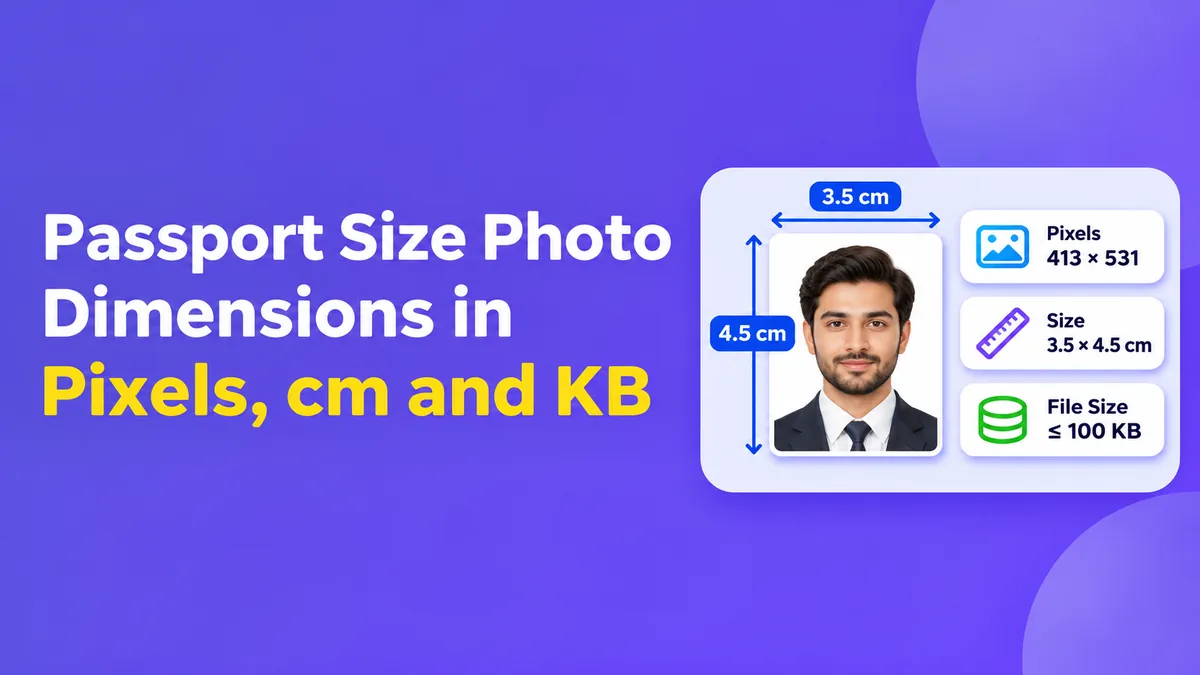
However, a common size is 35 x 45mm. In the USA passport applications usually require a 2x2 inch photo.
Always double check what the exact size is required to be.
Common Passport Size Photo Sizes
Below is a list of common portrait photo sizes and their approximate pixel sizes for 300 DPI.
| Photo SizeCentimetresPixels (300 DPI) | ||
| 35 x 45mm | 3.5 x 4.5cm | 413 x 531px |
| 2 x 2in | 5.08 x 5.08cm | 600 x 600px |
| 30 x 40mm | 3 x 4cm | 354 x 472px |
| 40x50mm | 4 x 5cm | 472 x 591px |
Note: These are calculations. Government applications may require a different pixel size, resolution, background and file type.
Therefore, ensure you follow their instructions.
Passport Size Photo (Pixels)
Pixels are the building blocks of any picture.
If your application requires you to upload your passport size photo in pixels, you’ll be given the width and height.
For example, 600 x 600 pixels would mean the photo must be 600 pixels wide and 600 pixels tall.
These will determine how large your photo will be digitally. However, it depends on what resolution you choose to print it at.
For example, a 413 x 531 pixel photo will be approximately the same size as a 35 x 45mm photo when printed at 300 DPI.
Some application portals will require you to use a specific pixel size.
If the website requires a specific width and height then use this.
Passport Size Photo (CM)
Passport photos are often measured in centemetres.
A 3.5 x 4.5cm photo would be 3.5cms wide and 4.5cms tall.
To convert into millimetres you can simply multiply by 10.
This means a 3.5 x 4.5cm photo would be 35 x 45mm.
If you’re looking to print your photos then choose the correct size in your photo editing or printing software.
Ensure your photo has the correct proportions.
Otherwise, your photo may become distorted.
Cropping your photo to the correct proportions would be more appropriate.
Converting CM to Pixels for Passport Photo
You can calculate the pixel size by knowing the physical size and resolution.
The calculation is:
Pixels = (Centimetres / 2.54) x DPI
For example, if your photo is 3.5 x 4.5cm and at 300 DPI.
Width:
(3.5 / 2.54) x 300 = ~ 413 pixels
Height:
(4.5 / 2.54) x 300 = ~ 531 pixels
Your photo would be approximately 413 x 531 pixels.
However, if you were to print it at 200 DPI you’d need less pixels.
This is useful to know when printing your images, however, if the online portal asks for a specific pixel size then use this.
What is DPI for Passport Size Photo?
DPI stands for Dots Per Inch. This refers to how high quality your print is.
In digital photo editing, PPI (Pixels Per Inch) would be the more appropriate term. However, many photo editing tools and applications will refer to DPI.
The higher the resolution the more detailed your photo can be when printed, providing you have enough detail in the original photo.
For example, a 35 x 45mm photo at 300 pixels per inch would be approximately 413 x 531 pixels. Simply changing the DPI won’t increase the detail in your image.
If your photo is blurry or very small then increasing the DPI won’t create more detail.
Try using a clear photo.
Passport Size Photo (KB)
KB means kilobytes. This isn’t referring to the size of your photo physically. Two photos with the same pixel size can vary greatly in size.
This is due to the compression, complexity, colours and file type.
For example, you may be asked to upload a photo under 100KB in jpeg format. Another application may allow up to 500KB or have a min and max.
There is no universal size needed. Always check the upload instructions for the form.
Passport Size Photo Requirements in Pakistan
Passport photos are often required in Pakistan for educational admissions, jobs, ID and government applications.
However, each organisation may have different requirements.
The photo needed to be printed may not match the digital photo needed by an online government application.
For passport applications in Pakistan refer to the current instructions on the Directorate General of Immigration & Passports website or official application.
If your application asks for specific background, age of photo, pixel size or KB then ensure you adhere to this.
Don’t assume that a 35 x 45mm photo will work for all applications in Pakistan.
How to Scale Passport Size Photo Online
You can use an online image scaler. To do this, open a reputable photo editing website. Upload your photo.
Look for options to scale or crop. Enter in the width and height required.
If you’re asked for pixels then ensure you’re using this option.
Carefully crop your photo to ensure the face is in the right place and the photo looks natural.
Once you’re happy, export your photo in the correct format. Usually a jpeg.
Check that your photo is the right size.
If it’s an identity photo, try using an offline photo editor.
How to Compress Your Passport Photo
If you’ve exceeded the size limit then you can compress your photo.
Resize your photo to the exact pixel size required.
Save as a jpeg if possible.
Change the quality slowly. Check the size of your photo. Ensure that your photo still has good detail.
Faces and edges should still be clear.
Don’t over compress as this can cause artefacts.
If you’re still exceeding then check what the application accepts for size and compression.
Common Mistakes
Confusing pixel size with KB. A 600 x 600 pixel photo isn’t a 600KB photo.
Incorrect aspect ratio. You may get a stretched or cropped photo.
Bad lighting, busy backgrounds and low resolution.
Don’t use beauty filters or edit your photo too much. This should be an ID photo.
Don’t assume your photo will work for another application. Always check the instructions.
Final Thoughts
Knowing the passport size photo sizes (pixels, CM & KB) can help you create your photos for online forms, printed applications and ID.
Remember that centimetres are the physical size, pixels are the digital size and KB is the file size.
A 35 x 45mm photo will be approximately 413 x 531 pixels when converted to 300 DPI. This is just one common size.
The correct size will depend on the country, institution or application.
Double check your photo is the correct width, height, file type, background and maximum size.
Taking a few minutes to prepare your photo can help prevent your upload failing and causing delays.